Widgets & themes
Tutkem Studio by Mostafa Abdelazeem
Wadiget: widgets and themes for your Android home screen
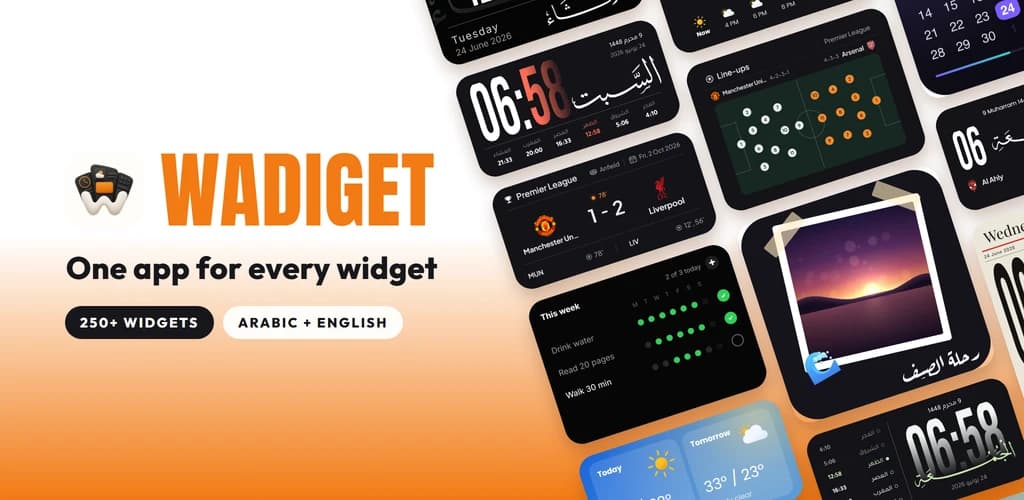
Wadiget, listed on Google Play as “Widgets & Themes”, is an Android widget app with more than 250 ready-made widgets: glass clocks, prayer times and Azan, live football, a Pomodoro timer, to-do lists, notes, weather and 4K wallpapers. Pick a design, change what you like and add it to your screen. No template files and no second app to install.
4.82,479 ratings on Google Play
- 103K+ downloads
- Android 10 or later
- Version 5.0.0
- Updated Oct 2026
- Average rating
- 4.8
- Ratings
- 2,479
- Downloads
- 103K+
- Widgets
- 250+
Screenshots from Google Play
Features
Everything inside Wadiget
More than 250 widgets, 20 analog clock faces and 70+ wallpapers, in Arabic and English.
New widgets without an app update
New widgets are designed in the Wadiget studio and appear in the app as soon as they go live. No Play Store update needed.
Glass, solid or gradient
Every widget can wear any of the three looks: light or dark glass, a solid card, or a gradient of two colours you pick, with opacity from 0% to 100%.
Make every widget yours
A live preview shows the widget as it will look on your screen. Change the size (up to 10 sizes, from 1×1 to 4×5), corners, border, colours, fonts, digits, 12 or 24-hour time and what a tap does.
Clock widgets
Digital clocks with big digits, tall clocks that fill a 2×4 widget, and 20 analog clock faces.
Prayer times and Azan
Fajr to Isha for your city, the next prayer and the time left, with 12 calculation methods and Standard or Hanafi Asr. Azan in five voices, and prayer times keep showing with no connection.
Tasbih, Hijri date and Quran
Count on the tasbih widget without opening the app, see the Hijri date beside the Gregorian, and add Quran verse widgets or a Ramadan countdown.
Arabic calligraphy
The weekday drawn by hand in Thuluth script, beside the clock, the date or the next prayer. Most designs come in Arabic and English in the same widget.
Live football
Live scores, line-ups on the pitch, league tables, fixtures and results for the leagues and the club you follow, with match alerts. Part of Wadiget Pro.
Pomodoro focus timer
Start, pause and stop a focus session from the widget. Set your focus, break and long-break lengths and get a notification when each one ends.
To-do, reminders and shopping list
Tick a task on the home screen when it is done and get a notification when it is due. The shopping list keeps items and quantities, and clears bought items in one tap.
Notes, habits and expenses
Sticky notes, a habit tracker with streaks, an expense tracker with a monthly budget, countdowns to birthdays and events, and a step counter. What you write stays on your phone.
Photos, music, weather and calendar
Photo widgets with your own pictures, a now-playing music widget, weather for the coming hours and seven days, month grids and week strips, plus battery and storage widgets.
4K wallpapers
More than 70 wallpapers made to sit behind widgets, up to 4K.
Lock screen widgets
On supported Samsung Galaxy phones, selected widgets can also go on the lock screen.
How it works
On your home screen in three steps
Pick a design
Browse more than 250 widgets by category and choose the one you like.
Make it yours
Change its look, size, colours and fonts while a live preview shows the result.
Add it to your screen
Place it on your home screen. It keeps itself up to date from there.
Reviews
Loved on Google Play.
Real words from people who put Wadiget on their home screen.
4.8
2,479 ratings on Google Play
FAQ
Questions people ask about Wadiget
What is Wadiget?
Wadiget is a widgets and themes app for Android made by Tutkem Studio. It gives you more than 250 ready-made, customizable widgets for your home screen, in Arabic and English.
Is Wadiget free?
Yes. Wadiget is free to download and most of its widgets are free. Wadiget Pro (monthly, yearly or a one-time lifetime purchase) unlocks the Pro widgets, clock faces, wallpapers and football, and removes ads from the app. Widgets on your home screen never show ads.
Which phones does Wadiget work on?
Phones and tablets running Android 10 or later. On supported Samsung Galaxy phones, selected widgets can also be placed on the lock screen.
Do I need KWGT or another app to use it?
No. Wadiget works on its own: there is no second app to install and no template files to import. You pick a ready-made widget, adjust it in the app and add it to your screen.
How is Wadiget different from KWGT, Glassify and other widget apps?
KWGT is a widget editor, where you build widgets yourself or import presets. Wadiget takes the ready-made route: more than 250 finished widgets that you restyle with a live preview. It also covers things many widget apps leave out, such as prayer times and Azan, the Hijri date, Arabic calligraphy and live football, and it adds new widgets without an app update.
Does Wadiget support Arabic?
Yes. The app and most widgets come in Arabic and English, with Arabic or Latin digits, 10 Arabic fonts, the Hijri date and hand-drawn Thuluth calligraphy.
Do prayer times work without the internet?
Yes. Prayer times keep showing with no connection. Location is used to find your city, or you can set the city by hand. Weather and football do need a connection.
Why did my clock widget stop updating?
Some phones pause apps in the background to save battery. To keep widgets on time, allow Wadiget to run in the background in your phone's battery settings.
Is it Wadiget, Wadget or Widget?
The app's name is Wadiget. On Google Play it is listed as “Wadiget - Widgets & Themes”, which is why many people look for it as “Widgets & Themes” or simply “the widgets app”.
How do I contact support?
Email mostafa.abdo.ch12@gmail.com. Messages go straight to the developer.